
3 posts tagged with "v0.3.2"

View All Tags

· 3 min read
Yung-Hsiang Hu

National Taiwan University's Liang-Hsuan Tseng and NTU COOL team released the Cool-Whisper model last night (7/17), which is suitable for recognizing Taiwanese pronunciation Chinese or mixed Chinese-English audio files.
Kuwa can directly apply it by simply modifying the Modelfile.
info

The model was temporarily taken offline around 12:00 on 7/18 due to privacy concerns.
Friends who want to use this model can continue to follow its HuggingFace Hub and use it once it is re-released.

Setup Steps​

  1. Refer to the Whisper setup tutorial to start the Whisper executor

    • The Cool-Whisper model is approximately 1.5 GB in size and will occupy up to 10 GB of VRAM during execution
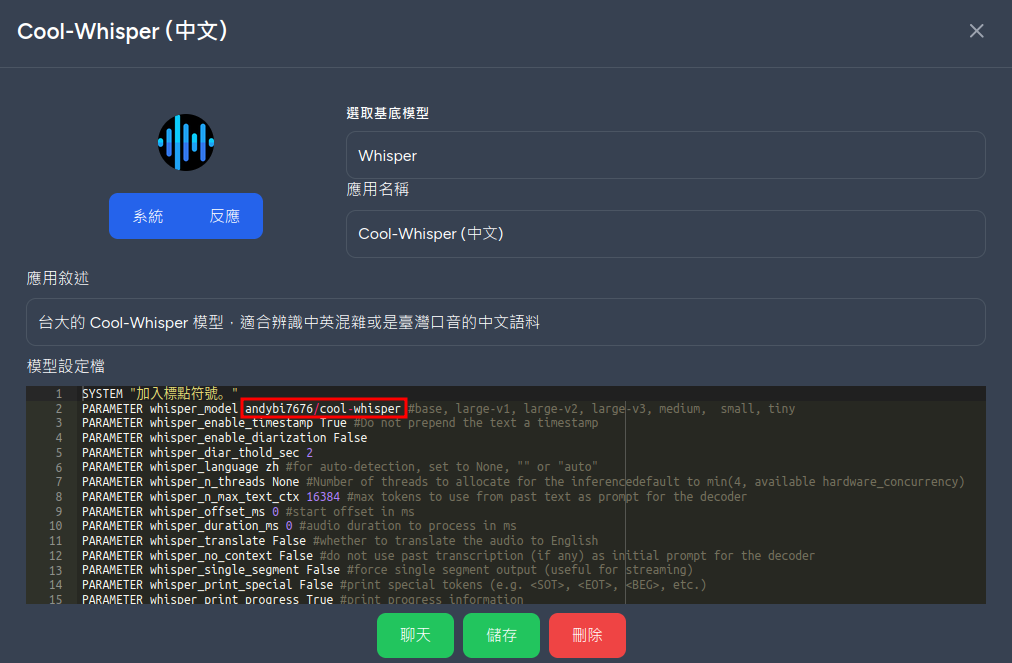
  2. Create a new bot named Cool-Whisper in the store, select Whisper as the base model, and fill in the following model settings file, focusing on the PARAMETER whisper_model andybi7676/cool-whisper parameter

    SYSTEM "加入標點符號。"
    PARAMETER whisper_model andybi7676/cool-whisper #base, large-v1, large-v2, large-v3, medium, small, tiny
    PARAMETER whisper_enable_timestamp True #Do not prepend the text a timestamp
    PARAMETER whisper_enable_diarization False
    PARAMETER whisper_diar_thold_sec 2
    PARAMETER whisper_language zh #for auto-detection, set to None, "" or "auto"
    PARAMETER whisper_n_threads None #Number of threads to allocate for the inferencedefault to min(4, available hardware_concurrency)
    PARAMETER whisper_n_max_text_ctx 16384 #max tokens to use from past text as prompt for the decoder
    PARAMETER whisper_offset_ms 0 #start offset in ms
    PARAMETER whisper_duration_ms 0 #audio duration to process in ms
    PARAMETER whisper_translate False #whether to translate the audio to English
    PARAMETER whisper_no_context False #do not use past transcription (if any) as initial prompt for the decoder
    PARAMETER whisper_single_segment False #force single segment output (useful for streaming)
    PARAMETER whisper_print_special False #print special tokens (e.g. <SOT>, <EOT>, <BEG>, etc.)
    PARAMETER whisper_print_progress True #print progress information
    PARAMETER whisper_print_realtime False #print results from within whisper.cpp (avoid it, use callback instead)
    PARAMETER whisper_print_timestamps True #print timestamps for each text segment when printing realtime
    PARAMETER whisper_token_timestamps False #enable token-level timestamps
    PARAMETER whisper_thold_pt 0.01 #timestamp token probability threshold (~0.01)
    PARAMETER whisper_thold_ptsum 0.01 #timestamp token sum probability threshold (~0.01)
    PARAMETER whisper_max_len 0 #max segment length in characters
    PARAMETER whisper_split_on_word False #split on word rather than on token (when used with max_len)
    PARAMETER whisper_max_tokens 0 #max tokens per segment (0 = no limit)
    PARAMETER whisper_speed_up False #speed-up the audio by 2x using Phase Vocoder
    PARAMETER whisper_audio_ctx 0 #overwrite the audio context size (0 = use default)
    PARAMETER whisper_initial_prompt None #Initial prompt, these are prepended to any existing text context from a previous call
    PARAMETER whisper_prompt_tokens None #tokens to provide to the whisper decoder as initial prompt
    PARAMETER whisper_prompt_n_tokens 0 #tokens to provide to the whisper decoder as initial prompt
    PARAMETER whisper_suppress_blank True #common decoding parameters
    PARAMETER whisper_suppress_non_speech_tokens False #common decoding parameters
    PARAMETER whisper_temperature 0.0 #initial decoding temperature
    PARAMETER whisper_max_initial_ts 1.0 #max_initial_ts
    PARAMETER whisper_length_penalty -1.0 #length_penalty
    PARAMETER whisper_temperature_inc 0.2 #temperature_inc
    PARAMETER whisper_entropy_thold 2.4 #similar to OpenAI's "compression_ratio_threshold"
    PARAMETER whisper_logprob_thold -1.0 #logprob_thold
    PARAMETER whisper_no_speech_thold 0.6 #no_speech_thold
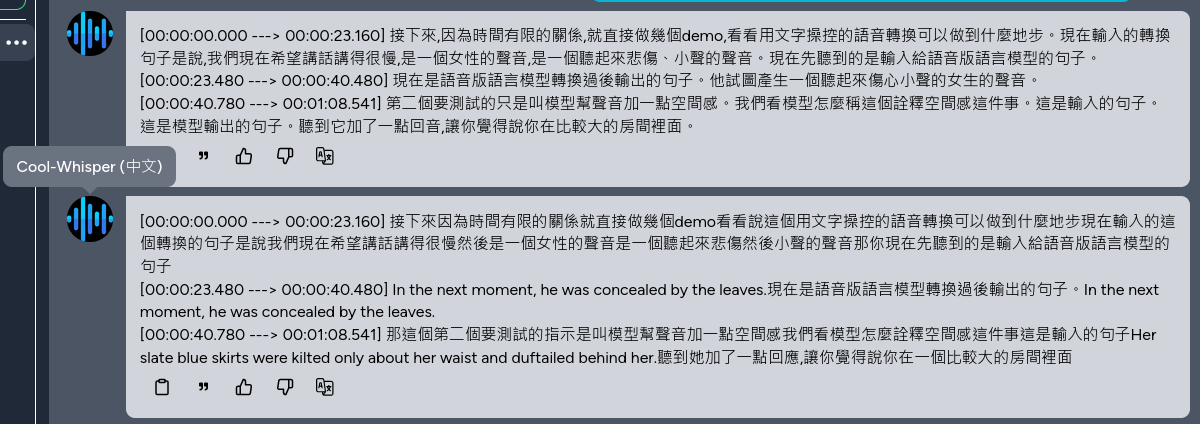
  3. You can now use the Cool-Whisper model for speech recognition. The following figure shows the use of Whisper and Cool-Whisper for recognizing mixed Chinese-English audio files, which can accurately recognize mixed Chinese-English scenarios

References​

  1. Cool-Whisper's HuggingFace Hub
  2. Professor Lee's Facebook post

· 2 min read
Yung-Hsiang Hu

Kuwa's RAG application (DocQA/WebQA/DatabaseQA/SearchQA) supports customization of advanced parameters through the Bot's model file starting from version v0.3.1, allowing a single Executor to be virtualized into multiple RAG applications. Detailed parameter descriptions and examples are as follows.

Parameter Description​

The following parameter contents are the default values for the v0.3.1 RAG application.

Shared Parameters for All RAGs​

PARAMETER retriever_embedding_model "thenlper/gte-base-zh" # Embedding model name
PARAMETER retriever_mmr_fetch_k 12 # MMR fetch k chunks
PARAMETER retriever_mmr_k 6 # MMR fetch k chunks
PARAMETER retriever_chunk_size 512 # Length of each chunk in characters (not restricted for DatabaseQA)
PARAMETER retriever_chunk_overlap 128 # Overlap length between chunks in characters (not restricted for DatabaseQA)
PARAMETER generator_model None # Specify which model to answer, None means auto-selection
PARAMETER generator_limit 3072 # Length limit of the entire prompt in characters
PARAMETER display_hide_ref False # Do not show references

DocQA, WebQA, SearchQA Specific Parameters​

PARAMETER crawler_user_agent "Mozilla/5.0 (Windows NT 10.0; Win64; x64) AppleWebKit/537.36 (KHTML, like Gecko) Chrome/117.0.0.0 Safari/537.36" # Crawler UA string

SearchQA Specific Parameters​

PARAMETER search_advanced_params "" # Advanced search parameters (SearchQA only)
PARAMETER search_num_url 3 # Number of search results to retrieve [1~10] (SearchQA only)

DatabaseQA Specific Parameters​

PARAMETER retriever_database None # Path to vector database on local Executor

Usage Example​

Suppose you want to create a DatabaseQA knowledge base and specify a model to answer, you can create a Bot,
select DocQA as the base model, and fill in the following Modelfile.

PARAMETER generator_model "model_access_code" # Specify which model to answer, None means auto-selection
PARAMETER generator_limit 3072 # Length limit of the entire prompt in characters
PARAMETER retriever_database "/path/to/local/database/on/executor" # Path to vector database on local Executor

· One min read
Yung-Hsiang Hu

Kuwa is designed to support the connection of various non-LLM tools. The simplest tool can refer to src/executor/debug.py. The following is a content description.

import os
import sys
import asyncio
import logging
import json
sys.path.append(os.path.dirname(os.path.abspath(__file__)))

from kuwa.executor import LLMExecutor, Modelfile

logger = logging.getLogger(__name__)

class DebugExecutor(LLMExecutor):
def __init__(self):
super().__init__()

def extend_arguments(self, parser):
"""
Override this method to add custom command-line arguments.
"""
parser.add_argument('--delay', type=float, default=0.02, help='Inter-token delay')

def setup(self):
self.stop = False

async def llm_compute(self, history: list[dict], modelfile:Modelfile):
"""
Responsible for handling the requests, the input is chat history (in
OpenAI format) and parsed Modelfile (you can refer to
`genai-os/src/executor/src/kuwa/executor/modelfile.py`), it will return an
Asynchronous Generators to represent the output stream.
"""
try:
self.stop = False
for i in "".join([i['content'] for i in history]).strip():
yield i
if self.stop:
self.stop = False
break
await asyncio.sleep(modelfile.parameters.get("llm_delay", self.args.delay))
except Exception as e:
logger.exception("Error occurs during generation.")
yield str(e)
finally:
logger.debug("finished")

async def abort(self):
"""
This method is invoked when the user presses the interrupt generation button.
"""
self.stop = True
logger.debug("aborted")
return "Aborted"

if __name__ == "__main__":
executor = DebugExecutor()
executor.run()